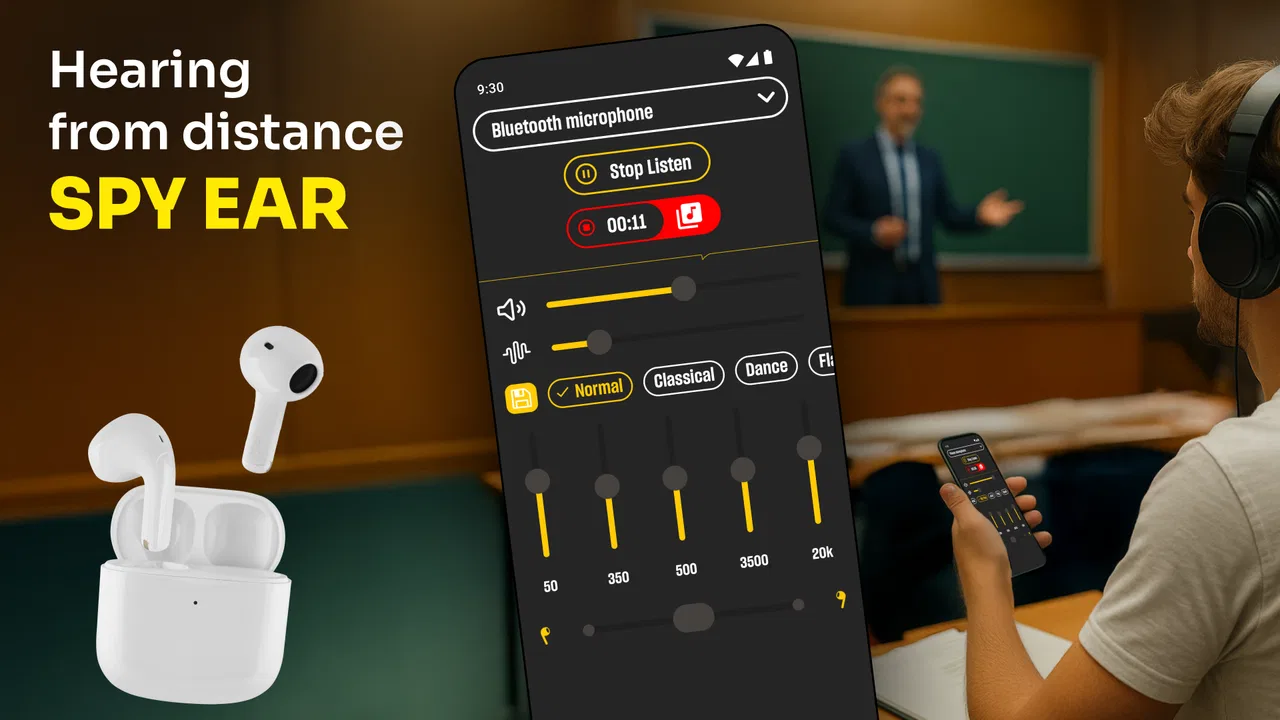
Hearing from Distance: Spy Ear
- 4.5
- Rating
- 1.00M
- Installs
- Free
- Price
 Analysis by App-foxy
I approached Hearing from Distance: Spy Ear as a simple listening aid rather than a replacement for specialist medical equipment. Its purpose is easy to understand: use a phone to make distant voices, television audio, or nearby environmental sounds easier to hear. That can be useful in a quiet room, during a conversation, or when you want to pay closer attention to what is happening around you. It is a free medical app from Wallet Passes Alliance, rated for Everyone, and it has attracted a large audience on Android.
My overall impression is that its usefulness depends less on a complicated feature set and more on the conditions around the phone. A quiet environment, sensible phone placement, and a clear understanding of what the app can realistically do matter more than simply pressing a start button. If you expect a professional hearing device, you will probably be disappointed. If you want a quick way to experiment with your phone’s microphone and listening output, it is much easier to appreciate.
Where the experience usually gets stuck
The first point of friction is expectation. The wording around hearing distant sounds can make the app sound like a long-range listening tool, but a phone microphone still has ordinary physical limits. It cannot reliably separate a faraway speaker from traffic, fans, people talking, or room echo. In practice, the app is most sensible when the phone can be placed relatively near the sound source while you listen from a more comfortable position.
You May Also Like

 Blood Strike: 2.5 Anniversary
Blood Strike’s Loadouts Turn Every Drop Into a Tactical Gamble
A close look at Blood Strike’s custom loadouts: how fast access to signature weapons reshapes its battle royale rhythm, rewards preparation, and narrows the gap between fights.

 Pandora - Music & Podcasts
Pandora’s Music Is Easy to Start, but Harder to Recover
Pandora’s strength is its low-effort path from a seed to a station. Its weak spot is how much confidence it asks you to place in connection, setup, and quiet recovery.

 8 Ball Pool
 Is Built on Rivalries, Rematches, and Routine
A close look at the rivalries, rematches, shared routines, and unanswered safety questions that turn a quick pool match into a persistent mobile community.

 Samsung Music
’s Quiet Strength Is Playing What You Already Own
Its reach comes less from spectacle than from dependable access to a personal library. That simplicity is both the app’s strongest retention engine and its ceiling.

 AccuWeather: Weather Radar
AccuWeather Review: A Quick, Clear Forecast for Everyday Decisions
For everyday plans, the best forecast is the one you can understand quickly. AccuWeather makes rain timing, radar, and local conditions easy to act on, with a few trade-offs.

 Hill Climb Racing
Why Hill Climb Racing Still Turns Crashes Into One More Run
A tiny car, a bumpy hill and one more upgrade: Hill Climb Racing keeps resurfacing because its simple chaos makes every near-miss feel personal.
More From Our News Desk



That distinction changes how I would use it. For television, I would put the phone on a table close to the television rather than leave it beside me across the room. For a conversation, I would place it where it has a clear path to the speaker, not inside a pocket or behind a cushion. The app may make the signal more noticeable, but it does not turn a distant or obstructed microphone into a professional directional system.
Another common stumbling block is feedback. When a phone captures sound through its microphone and sends it to a speaker or connected listening device, the output can sometimes be picked up again by the microphone. That creates a whistle, ringing tone, or unpleasant echo. This is not necessarily an app failure. It is often the result of placing the phone too close to its playback source or using a loud volume in a reflective room.
I found that the safest way to begin is with the phone and listening output separated as much as possible. Start quietly, test for a few seconds, and raise the volume gradually. Holding the phone directly next to a speaker may produce a louder signal, but it also makes feedback more likely. A small change in position can be more effective than immediately increasing the volume.
There is also a usability issue that affects many microphone-based apps: the phone must remain in a useful position while you listen. A handset lying flat on a soft surface may have its microphone partly covered. A case, hand, table edge, or fabric can muffle the sound. If the result seems weak, I would first reposition the phone before assuming that the app is malfunctioning.
What I check before blaming the app
My first check is whether the phone can record ordinary sound clearly outside the app. A quick test with the phone’s built-in recorder or a voice message can reveal whether the microphone is blocked, damaged, or simply being covered. If recordings sound muffled everywhere, changing settings inside this app is unlikely to solve the problem.
I also check the playback route. If sound is expected through the phone speaker, I make sure the speaker opening is not covered and that the volume is audible without being pushed to an uncomfortable level. If I am using another listening device, I confirm that it is actually receiving sound from the phone. Bluetooth connections, wired accessories, and phone audio settings can each introduce their own delay or silence.
Battery-saving behavior is another practical consideration. Some phones restrict background activity or reduce access to hardware when an app has been idle. I would keep the screen active during a listening session and avoid switching repeatedly between applications while testing. This is not a promise that every phone handles the app identically; it is simply a sensible way to remove unnecessary variables.
The app is available for Android devices running at least Android 5.0, and the current listed version is 2.1.2. That broad compatibility is convenient for people using an older handset, but older hardware may still have a weaker microphone, a less capable speaker, or more noticeable audio delay than a newer phone. Compatibility with the operating system does not guarantee identical listening quality across every device.
A calmer setup produces a better result
I recommend beginning in a quiet room with one sound source. Television is a good test because the content is continuous and easy to compare. Place the phone near the television, listen at a low level, and adjust the position before adjusting volume. This helps you decide whether the app is improving intelligibility or merely making every background noise louder.
For speech, the phone should face the person as directly as practical, with the microphone unobstructed. Avoid placing it inside a bag or under clothing. If you need to carry it, a small stand or stable surface is usually better than holding it tightly in your hand, because handling noise can become part of the amplified signal.
I would also test with short sessions rather than leaving the app running immediately. Listen for speech clarity, echo, delay, and fatigue. A louder sound is not automatically a clearer sound. If consonants remain difficult to understand while room noise becomes more prominent, the setup is not helping enough, even if the overall volume has increased.
One useful habit is to compare the app with the unaided sound at the same distance. Turn it off briefly, then return to the same position and listen again. This gives you a more honest impression than judging the amplified signal on its own. It also reveals whether the benefit comes from better access to the desired sound or simply from increased loudness.
Because this is categorized as a medical app, I would be especially careful with volume. I would not use it as a reason to listen loudly for long periods, and I would stop if the sound becomes painful, harsh, or tiring. It should not be treated as a diagnosis, a hearing test, or a substitute for professional advice when hearing difficulty is persistent, sudden, or affecting everyday safety.
Recovering when a listening session goes wrong
When I get silence, I work through the chain in order: microphone, app, playback, and listening position. First I speak near the phone or make a simple sound to see whether the input is being captured. Then I check whether the phone’s output is audible. Finally, I move the handset away from the speaker or listening device to rule out feedback and interference.
If the sound is distorted, reducing volume is usually my first move. Distortion can happen when the incoming sound is already loud or when the output is pushed too hard. Moving the phone a little farther from the source may also help. The goal is not to capture the strongest possible signal; it is to capture one that remains understandable.
If there is a delay, I avoid using the app for situations where timing matters. A small lag may be acceptable for television or a one-person conversation, but it can make group discussions awkward because the amplified voice arrives after the speaker’s mouth has moved. That is one of the clearest trade-offs compared with simply listening directly.
When the app appears to stop responding, I would close it and reopen it, then repeat the quiet-room test. Restarting the phone can also clear a temporary audio-routing problem. I would avoid changing several system settings at once, because that makes it difficult to identify what actually fixed the issue. A controlled reset is more useful than random tapping.
Some users may also wonder whether they need a particular kind of accessory. I would not assume that an external headset, speaker, or hearing device will behave exactly like the phone’s built-in speaker. Each accessory can change volume, delay, microphone routing, and feedback risk. If an accessory produces no sound, test the app through the phone first; if the phone works, the problem is more likely in the connection or audio route than in the basic listening function.
The app is free to install, although in-app purchases are listed from $0.99 to $99.99 per item. I would treat any purchase as optional and evaluate the basic listening experience first. There is little value in paying for additional functionality if the phone’s microphone, room acoustics, or playback arrangement already prevents clear speech. Testing the core use case before spending money is the sensible order.
When the phone is not the real problem
Room acoustics often explain disappointing results. Bare walls, glass, tiled floors, and large empty spaces reflect sound, causing voices to arrive at the microphone from several directions. Curtains, rugs, furniture, and a quieter room can improve intelligibility without changing the app. This is particularly important for television listening, where reflections can make dialogue sound blurred.
Background noise creates a similar limitation. A fan, kitchen appliance, road, or several nearby conversations may be amplified along with the voice you want. In that situation, moving closer to the speaker or reducing competing noise is generally more effective than increasing the volume. The app cannot know which sound matters to you unless the surrounding conditions already give it a reasonable chance.
The phone itself may also be the weak link. Older microphones can sound thin or noisy, and some cases interfere with the microphone opening. A phone placed on a table may pick up tapping, vibration, or contact noise. If the app performs differently when the case is removed or the phone is moved to a hard, stable surface, that points to the physical setup rather than the software.
Hearing ability varies as well. Someone who needs occasional help following television dialogue may find this useful, while someone with significant or uneven hearing loss may need individualized amplification and medical assessment. The app cannot replace a correctly fitted hearing aid, clinical evaluation, or accessibility support designed around a person’s specific hearing profile.
I would skip this app for emergency monitoring, security decisions, or any situation where missing a sound could create danger. A phone can run out of battery, lose its audio route, be moved accidentally, or be overwhelmed by noise. It is also not appropriate to use a listening tool to invade another person’s privacy. The safest use is transparent, ordinary assistance with sounds you are already entitled to hear.
How it compares with familiar alternatives
Compared with simply raising the television volume, a phone-based listening setup can let you place the microphone nearer to the television and keep the room quieter. That may be more comfortable for other people nearby. The compromise is that the phone must stay positioned correctly, and the audio may not feel as natural as direct listening.
Compared with a dedicated hearing aid, the app is far less personal and predictable. Hearing aids are designed around the wearer, remain available without arranging a phone on a table, and usually handle everyday movement more gracefully. The phone approach is cheaper to try and may be useful as a temporary experiment, but it should not be mistaken for equivalent technology.
Compared with built-in accessibility features, this app may appeal to someone who wants a straightforward listening-focused tool rather than a broader collection of system controls. On the other hand, operating-system accessibility options may integrate more deeply with a particular phone and can be preferable when the goal is general device accessibility rather than listening to a nearby sound source.
Its strongest niche is therefore quite specific: a quick, low-cost way to test whether bringing a phone microphone closer to a sound source helps you hear it more comfortably. It is less convincing as an all-day solution, a long-distance microphone, or a replacement for professional hearing support.
My practical verdict
Wallet Passes Alliance has made a simple idea accessible to a large Android audience: use the phone you already have to make selected sounds easier to follow. The app’s 4.6 average from around 13 thousand ratings and more than a million installs suggest that many people find the concept worthwhile, but those figures do not remove the need for a realistic setup. Your result will depend heavily on the phone, room, sound source, and playback method.
I would recommend trying it if you want occasional help with television dialogue, a nearby conversation, or environmental listening in a controlled setting. Start with a quiet room, keep the microphone uncovered, separate it from the speaker, and use the lowest comfortable volume. Those steps are more important than chasing maximum loudness.
I would not recommend relying on it for serious hearing loss, safety-critical listening, or situations requiring natural, synchronized sound. In those cases, a hearing professional or dedicated hearing equipment is the better path. For everyone else, this is a reasonable free experiment, provided you judge it by clarity and comfort rather than by how loud it can make a room.
In my experience, the app earns its place when used as a practical temporary aid, not as magic. The key trade-off is convenience versus control: you can try it immediately with an existing Android phone, but you must manage placement, noise, feedback, and expectations yourself. If that sounds acceptable, it is worth testing; if you need dependable personalized amplification, choose a solution built for that purpose instead.
FAQs for Hearing from Distance: Spy Ear
01What is Hearing from Distance: Spy Ear and how does it work?
Hearing from Distance: Spy Ear is an app designed to amplify sounds from a distance, allowing users to hear conversations or noises that are otherwise hard to catch. It uses your device's microphone to pick up sounds and then amplifies them through headphones. This app is particularly useful in situations where you need enhanced hearing capabilities.
02Is Hearing from Distance: Spy Ear legal to use?
While the app itself is legal, users must ensure they comply with local laws regarding privacy and recording. It's crucial to use the app ethically, respecting others’ privacy and obtaining consent when necessary. Unauthorized recording or eavesdropping could lead to legal issues, so always use the app responsibly.
03What devices are compatible with Hearing from Distance: Spy Ear?
Hearing from Distance: Spy Ear is available for both Android and iOS devices. However, compatibility may vary based on the version of the operating system. For optimal performance, ensure your device is running a relatively recent OS version and has a functional microphone and headphone jack or Bluetooth capability.
04Are there any privacy concerns when using the app?
Yes, there are potential privacy concerns. The app requires access to your device's microphone and may inadvertently record sensitive information. Always be mindful of where and how you use the app to avoid breaches of privacy. It's recommended to review the app’s privacy policy and adjust your device's privacy settings accordingly.
05Does Hearing from Distance: Spy Ear require an internet connection?
No, Hearing from Distance: Spy Ear does not require an internet connection to function. The app operates using your device’s built-in microphone and audio output capabilities. However, an internet connection might be necessary for downloading updates or accessing customer support.
Pros
- Clear audio transmission over long distances.
- User-friendly interface with simple controls.
- Low battery consumption for extended use.
- Adjustable sensitivity settings for precision.
- Compatible with most Bluetooth devices.
Cons
- Potential privacy concerns with misuse.
- Requires a stable internet connection.
- Limited functionality without headphones.
- May drain battery quickly on older devices.
- Audio quality can vary with network stability.

Hearing from Distance: Spy Ear
Gallery